Bandwidth requirements for 4G CCTV streaming by camera resolution
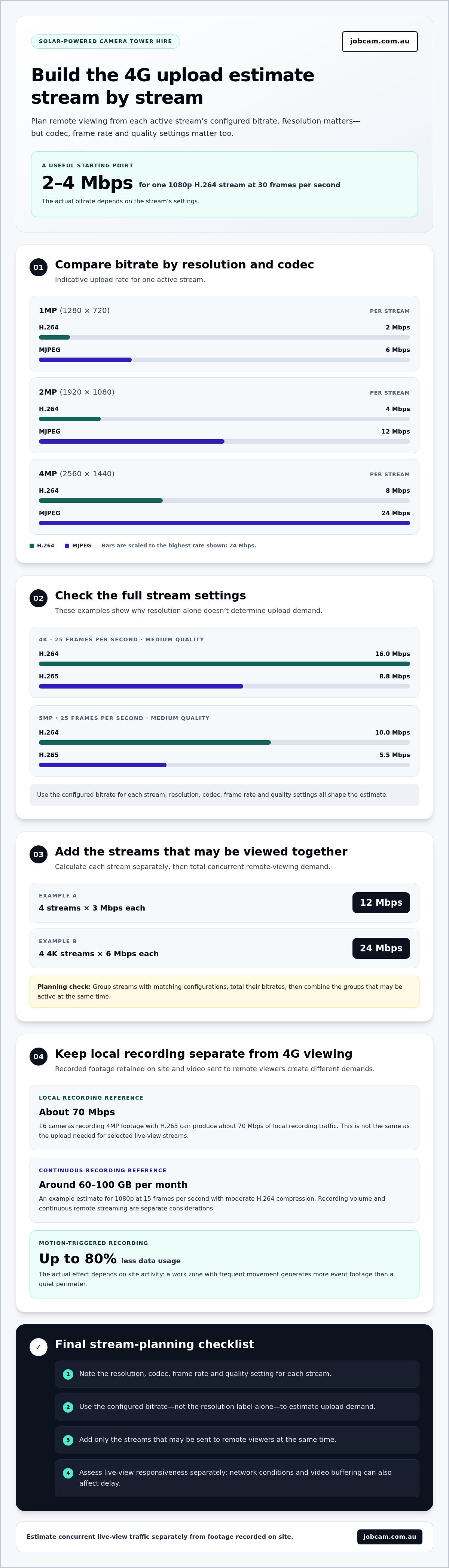
A 1080p CCTV stream using H.264 at 30 frames per second can use around 2-4 Mbps for a single stream. That’s the starting point for the bandwidth requirements for 4G CCTV streaming, but the actual load depends on resolution, compression and frame rate. Higher detail can demand more data, while efficient settings can reduce the stream’s bandwidth use.
Resolution matters when estimating data use, but it is only one part of the picture. Codec and frame rate also affect a camera’s upload needs, while available bandwidth influences how smoothly remote live viewing works.
This guide compares indicative bandwidth by resolution and compression, explains what a 1080p stream may use, and shows how 4G capacity relates to live-view latency. You’ll see why a camera’s recording stream and the stream used for remote viewing may have different demands, helping you plan for clear, accessible footage without relying on resolution alone.
Key Takeaways
- Estimate bandwidth from resolution, codec and frame rate together; resolution alone won’t give you the full picture.
- A 1080p stream using H.264 at 30 frames per second can use around 2-4 Mbps, depending on its settings.
- Separate local recording traffic from the upload capacity needed to view footage remotely.
- Use a lower-bitrate substream for routine remote viewing to reduce upload demand while retaining a higher-quality recording stream.
- Assess live-view delay separately from bandwidth: network conditions and video buffering can also affect responsiveness.
Indicative per-camera bandwidth by resolution and codec
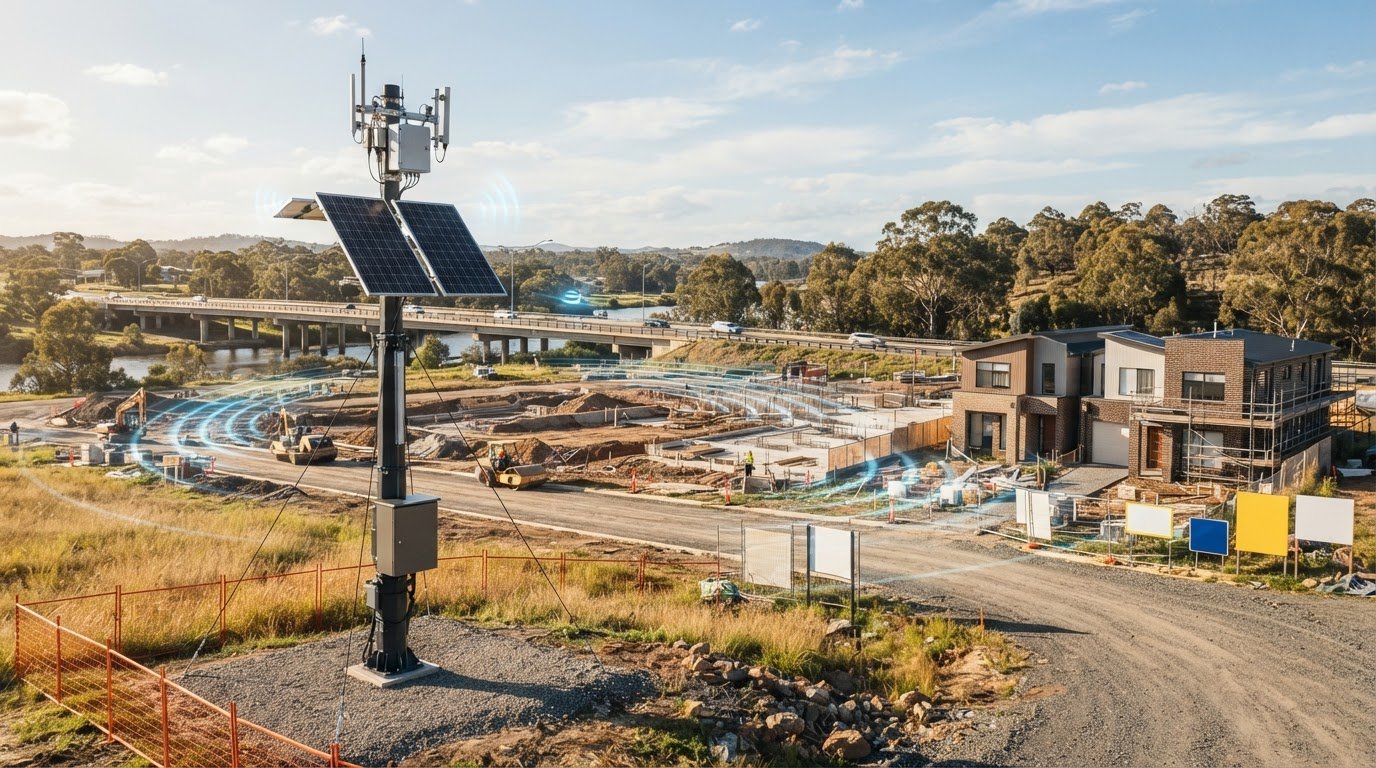
For a solar-powered camera tower used on a building site, estimate 4G upload from each active video stream’s bitrate. A single stream can range from 2 Mbps for 1MP H.264 to 24 Mbps for 4MP MJPEG, depending on its settings.
These figures help project teams plan remote viewing for a hired tower deployment. At 1MP (1280 × 720), indicative rates are 2 Mbps with H.264 and 6 Mbps with MJPEG. At 2MP (1920 × 1080), they are 4 Mbps with H.264 and 12 Mbps with MJPEG. At 4MP (2560 × 1440), the examples rise to 8 Mbps with H.264 and 24 Mbps with MJPEG.
How much upload bandwidth does a 4G CCTV camera need at different resolutions and frame rates? Use the configured bitrate for each stream: resolution and codec affect the estimate, while frame rate also changes the number of frames sent each second. For example, a 1080p H.264 stream at 30 frames per second can use around 2-4 Mbps.
Resolution labels alone don’t establish the tower’s upload requirement. A 4K stream at 25 frames per second and medium quality is estimated at 16.0 Mbps with H.264 or 8.8 Mbps with H.265. Those figures show why the codec and quality setting belong in the same estimate as resolution and frame rate.
For multiple hired tower streams, calculate each stream separately, then add the bitrates that may be active together. Four streams at 3 Mbps each total 12 Mbps; four 4K streams at 6 Mbps each total 24 Mbps. If a project uses different resolutions or codecs, group matching configurations and calculate each group before combining them.
This approach helps distinguish the capacity needed for remote viewing from the tower’s recording purpose. A project team can list the streams that need live access, note each configured bitrate, and total concurrent viewing demand. The estimate then reflects the actual site plan rather than assuming every camera sends the same amount of data. For a building-site deployment, relate stream settings to the building site CCTV requirements and the views the team needs remotely.
How much bandwidth does a 1080p CCTV camera use?
A 1080p stream using H.264 at 30 frames per second can use around 2-4 Mbps. For a solar-powered camera tower hire, distinguish this live-stream demand from footage recorded or stored without continuous internet transmission.
Local Recording and Network Headroom
Local recording keeps video traffic within the site’s recording setup, while remote viewing sends selected footage across the mobile connection. This distinction matters on a temporary project, where teams may need both a retained record and live access without sending every recording continuously over 4G.
For context, 16 cameras recording 4MP footage with H.265 can produce about 70 Mbps of local recording traffic. This illustrates why recording capacity and mobile upload are separate planning considerations. The stream viewed remotely, rather than the total recorded footage, determines the live connection load.
Monthly Data Use for Continuous Recording
Continuous recording captures video throughout the day, and the resulting data volume depends on bitrate, frame rate and compression. A 1080p camera at 15 frames per second with moderate H.264 compression might use around 60-100 GB per month.
For a hired tower on a changing construction site, distinguish continuous recording from continuous remote streaming. Footage stored for later review and video actively sent to viewers create different demands. The project’s monitoring routine determines how much footage needs to travel over the mobile connection.
Motion-Triggered Recording and Data Savings
Motion-triggered recording captures video around detected activity rather than recording continuously. During quiet periods, this can reduce the amount of footage stored or transmitted and help limit unnecessary mobile data use.
Motion-based recording can save up to 80% of CCTV data usage. The actual effect depends on site activity: a work zone with frequent movement will generate more event footage than a quiet perimeter. For tower planning, consider which areas need continuous visibility and where activity-based footage is suitable.
Local Recording Versus Internet Traffic
Local recording retains footage on-site; remote viewing sends a stream over the internet. 4G, 5G and fixed broadband connections differ in their available capacity, but the key comparison is whether their upload can carry the streams viewers need simultaneously.
Fixed broadband may serve an established site office, while a temporary solar-powered tower can use a mobile connection where fixed service is impractical. Either way, recorded footage and video actively sent to remote viewers have different bandwidth demands. Plan around the site’s connection and viewing needs, not recording volume alone.
Bandwidth estimates by resolution and compression
For a solar-powered camera tower hire, stream settings affect how much video travels over the mobile connection. H.264 and H.265 encode footage differently, so compare the configured bitrate alongside resolution and frame rate when planning remote access.
Resolution and Bandwidth Consumption
Resolution determines the image detail in each frame and affects how much data is needed to represent the scene. Higher detail may help when a tower monitors a broad work area or distant activity, but the resulting stream needs more capacity than a lower-resolution view.
Consider a 5MP stream at 25 frames per second and medium quality: the indicative estimate is 10.0 Mbps with H.264 or 5.5 Mbps with H.265. For a temporary site, this comparison helps assess the trade-off between image detail and the upload available for remote viewing.
Frame Rate and Compression Effects
Frame rate determines how often the stream sends a new image, while compression affects how much data is used to encode it. Both settings shape a tower’s video load, so estimate bandwidth based on the activity being monitored rather than a default configuration.
A higher frame rate can help when frequent movement needs closer review; a lower rate sends fewer frames. Match the rate to the scene and viewing purpose to avoid planning around a stream configuration the monitoring task does not need.
H.264 and H.265 Data Use
H.264 and H.265 are common compression technologies for video streams. H.265 is described as providing 40% better compression than H.264 Main, but the realised bitrate depends on the video and its settings.
That difference matters when a solar-powered tower sends footage over a mobile connection, especially if several remote views operate together. Compare the actual configured rates for each codec, resolution and frame rate. Don’t assume H.265 will always halve the data use; the same percentage reduction doesn’t apply to every stream.
Bitrate and Motion Recording Adjustments
Bitrate measures how much video data is sent each second. Lowering the configured bitrate can reduce transmission demand, while motion-triggered recording can limit footage captured or sent during inactive periods.
For a hired tower, match these settings to the project’s monitoring purpose. A perimeter view focused on occasional activity may suit event-based recording, while an area requiring continuous oversight may need another approach. Assess footage quality alongside upload demand, so data savings do not compromise the detail needed for site decisions.
Bandwidth and live-view latency
Congestion, coverage gaps and outages can interrupt 4G CCTV streaming, reduce available upload capacity, or leave remote viewers with delayed or frozen footage. A strong connection helps, but latency and bandwidth describe different parts of the internet connection.
Typical 4G router latency for CCTV is approximately 30-50 milliseconds, compared with approximately 10-20 milliseconds for 5G. These figures describe network latency, not the full time between movement onsite and its appearance on a viewer’s screen.
Latency measures how long data takes to travel between endpoints; bandwidth measures how much data can move at once. If a configured stream exceeds available upload capacity, it can queue, stutter or lose smooth playback. Several simultaneous live views add traffic, even if each camera’s bitrate stays the same.
Video buffering adds another layer. A buffer on the viewer’s device can add several seconds of latency to an IP surveillance stream, even when measured network latency is low. As a result, someone watching a live feed may see motion after it has happened onsite.
Network congestion can cause available capacity to fluctuate. If the connection cannot consistently carry the configured stream, remote viewing may become less responsive or pause temporarily. Coverage gaps pose a more direct risk: the stream can disconnect until the connection returns. Local recording can preserve footage during an internet interruption, but it cannot maintain live access.
Some systems switch to local storage after detecting a network failure. The camera may take up to four or five seconds to detect the failure and switch recording to local storage. This transition does not guarantee uninterrupted streaming; live access still depends on the internet connection.
For a practical assessment, separate three measures: configured stream bitrate, usable upload capacity and end-to-end viewing delay. First, total the simultaneous streams. Then compare their combined load with available upload capacity. Finally, observe the live feed during typical site activity, including movement and other network use. This helps identify whether capacity, coverage or buffering is the bottleneck.
Choosing between 4G and 5G involves more than comparing the typical latency figures. The site’s coverage, concurrent traffic and stream settings shape the viewing experience. A lower latency number may improve responsiveness, but it cannot remove delays caused by a receiving buffer or an overloaded upload connection.
4G CCTV streaming requirements
Planning the bandwidth requirements for 4G CCTV streaming starts with the streams sent off-site, not every camera’s local recording bitrate. Count simultaneous remote views, include each stream’s bitrate, then compare their combined upload demand with available capacity.
A useful example separates a camera’s main stream from its substream. One IP camera configured with a 6144 kbps main stream and a 1024 kbps substream requires 7.168 Mbps when both streams are included. The practical requirement changes if remote monitoring uses only one stream or viewers open additional cameras at once.
For routine viewing, lower-bitrate substreams can reduce upload demand while keeping a higher-quality stream available for recording. Four cameras viewed remotely with substreams of 0.5 to 1 Mbps each require 2 to 4 Mbps of upload. Remote viewing of 4 to 8 cameras using substreams requires up to roughly 8 Mbps of upload.
These estimates cover video upload, not all internet activity. Other traffic can compete for capacity, and available upload may vary. A connection that exactly matches the calculated video load leaves no room for those changes. Allow spare capacity to reduce the risk of streams stalling when activity increases.
Separate three requirements in the estimate:
- Recording: Local storage keeps the main video stream on-site and doesn’t automatically send all footage over 4G.
- Viewing: Each simultaneous remote stream adds its own bitrate to the upload load.
- Retention: Video stored locally and video transmitted continuously create different storage and data demands.
An IP camera, for example, may record a high-detail stream locally while sending a lower-bitrate stream for remote viewing. This can preserve recorded detail while limiting data sent over the mobile connection. Stream settings determine the balance between image detail, responsiveness and data use.
In Australia, pay particular attention to upload speed because internet plans may offer less upload capacity than download capacity. A fast download speed does not show how many cameras can stream outward. Compare available upload with the combined bitrate of active remote streams, then allow for simultaneous viewing and other network use.
A sound estimate of the bandwidth requirements for 4G CCTV streaming also identifies which cameras need live access, which stream each viewer uses, and whether views must run simultaneously. That creates a practical basis for matching 4G capacity to site monitoring needs, without treating local recording as continuous internet traffic.
Jobcam: Solar Security Cameras
Jobcam provides solar-powered camera towers for hire, supporting remote monitoring on construction sites and other projects. Its Solar Security Cameras connect through Telstra 4GX, with footage stored on AWS servers and accessible through a mobile app or web interface.
For project teams, the practical next step is to match required live-view streams and recording needs to the site’s connection. Jobcam’s Solar Surveillance Towers provide camera coverage without relying on fixed power infrastructure, while Time-lapse Video Cameras and Project Management Cameras support visual documentation of project progress.
Discuss your site’s monitoring and documentation needs with Jobcam. Visit jobcam.com.au to get in touch.
Turn your bandwidth estimate into a site plan
The next step is to translate the bandwidth requirements for 4G CCTV streaming into a clear operating brief. Identify which areas need live visibility, who needs remote access, and whether project documentation matters alongside day-to-day monitoring. Those decisions help shape a setup around the worksite rather than a theoretical maximum stream.
For a construction or remote project, bring camera locations, viewing priorities and connection conditions together in one plan. This gives the discussion a practical starting point and helps align footage access with how your team manages the site.
Jobcam can help you consider a suitable camera tower hire setup for your project’s monitoring and documentation needs. Contact Jobcam about your 4G CCTV setup and take the next step towards clearer site visibility.
Frequently Asked Questions
Is more bandwidth better?
More bandwidth helps when several high-bitrate streams or viewers share a connection, but it is not always necessary. For a single remote view, capacity beyond the stream’s needs may not improve image quality or resolve buffering caused by latency. Account for concurrent views and other internet traffic, then match the connection to that workload. Stream settings and stable coverage matter as much as raw capacity.
Can Multiple 4K CCTV Cameras Slow Down Wi-Fi?
Yes, multiple 4K streams can slow Wi-Fi if their combined traffic approaches the capacity available on the wireless network. This can affect viewing devices using the same connection, even when cameras record locally. The impact depends on each stream’s bitrate, simultaneous viewers and other network activity. For a worksite, distinguish between video sent over Wi-Fi locally and footage uploaded through a mobile connection. They create different demands.
Does Higher FPS Make a 4K CCTV Camera Use More Internet?
Yes. A higher frame rate sends more images each second and can increase the stream’s bitrate when resolution and compression remain unchanged. For example, footage at 30 frames per second carries more frames than footage at 15 frames per second. That can increase upload and data use during remote viewing. The right setting depends on how much motion detail the team needs to review, not resolution alone.
How Much Internet Does a 4K Camera Use for Remote Viewing?
A 4K camera configured at an average bitrate of 6 Mbps sends video at about 6 Mbps while that stream is active. Total data use depends on how long viewers watch and whether they view a main stream or a lower-bitrate substream. Several simultaneous viewers or cameras add traffic. For planning, distinguish a brief live check from continuous remote viewing across a full work shift.
How much data does a security camera use per month?
Continuous recording can use around 60-100 GB monthly for a 1080p camera at 15 frames per second with moderate H.264 compression. A continuously recording 4K camera might use 300-500 GB or more monthly. These examples describe recording volume, not necessarily internet consumption. If footage is stored locally, data sent over the internet depends on remote viewing, cloud uploads and the streams transmitted.
Is 30 Mbps enough for CCTV camera?
A 30 Mbps connection may support between 7 and 15 cameras using around 2-4 Mbps each for 1080p video. The usable capacity depends on whether that figure is available for camera uploads and whether other users or applications share it. For example, simultaneous remote views can consume capacity even if recordings stay onsite. Count the streams that will be active together, not just installed cameras.
What Is Bitrate and Why Does It Matter?
Bitrate is the amount of video data encoded or transmitted each second, commonly expressed in Mbps or kbps. It matters because it determines how much upload capacity an active stream requires and contributes to data use over time. A configured stream at 3 Mbps generates about 3 Mbps of video traffic while active. Resolution, frame rate, compression and image activity all influence the selected bitrate.
How much data does 4G CCTV streaming use per hour and per month?
A 1080p stream using H.265+ is estimated at around 150-300 MB per hour. If that stream runs continuously, the equivalent is roughly 108-216 GB over 30 days, calculated from the hourly range. Actual use changes with stream settings and viewing time. A local recording that isn’t uploaded doesn’t consume the same mobile data as continuous remote streaming.